


Understanding Sitemap
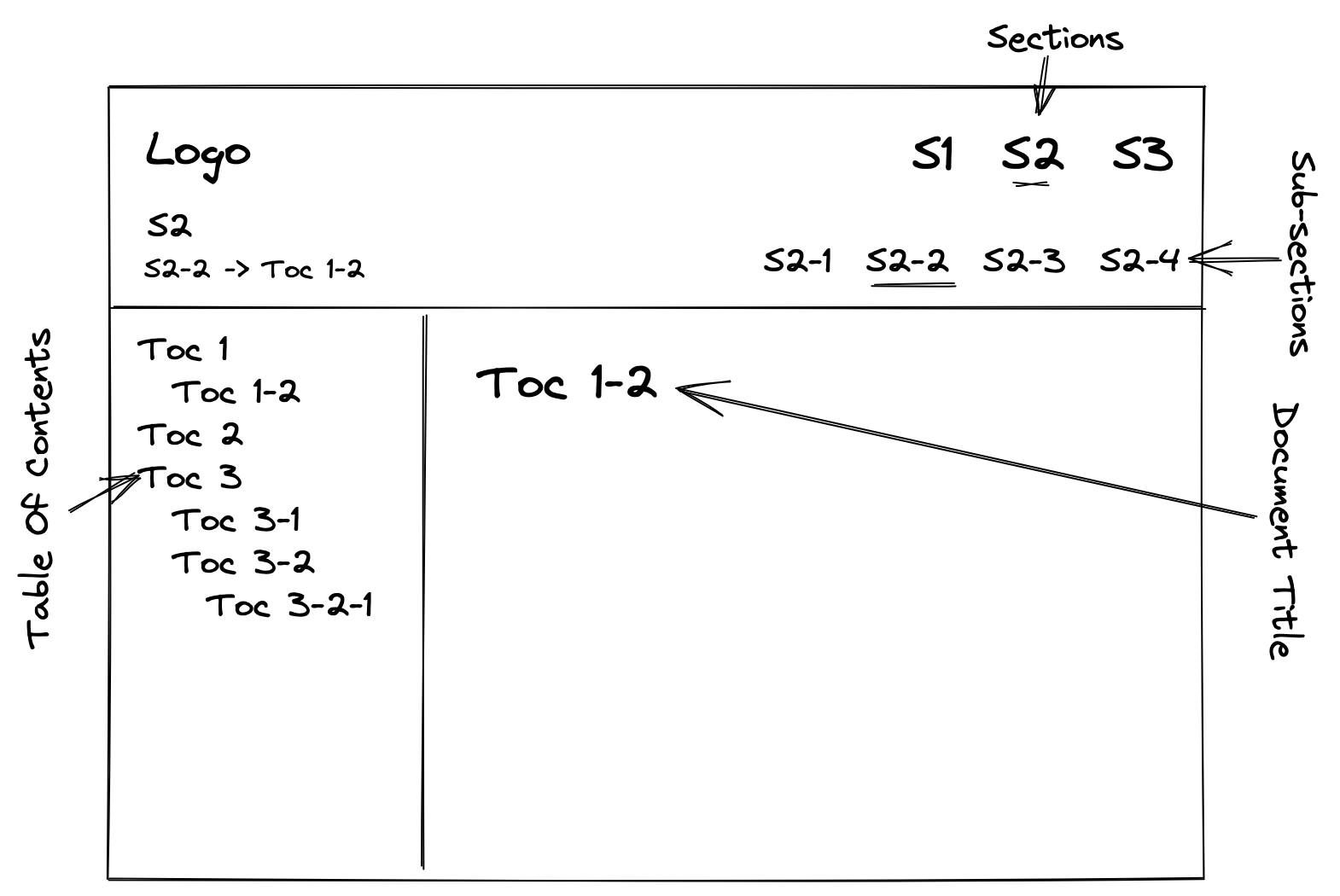
sitemapSitemap is used to create a structured representation of the files and pages
that make up a website. This structure is created over a layout which we will
talk about in a bit.
Why sitemap?
Just like a college library needs to organise their shelves, books in an order based on category or genre. Similarly, in a package, we want to organise the documents in different sections, subsections and TOCs.
Sitemap serves as a blueprint or roadmap, providing information about the
organization and hierarchy of content on the website.How to configure sitemap for your site
FASTN.ftd. So, we write:-- fastn.sitemap:
# Section: <url>
## SubSection: <url>
- TOC-1: <url>
- TOC-2: <url>
- SubTOC-2-1: <url>
- SubTOC-2-2: <url>
...
- for
sectionswe use# - for
subsectionswe use##, and - for
TOCsandsub-TOCswe use-
First section
# Home: /
Section Home is displayed on the webpage, which displays the content of
index.ftd document. The URL / corresponds to index.ftd document.
index.ftd file we need to write something
after /. For example, there is a file foo.ftd, then to access the foo
document, we need to write, /foo/.Second section
# Season: /season/summer/
summer.ftd.Subsections
season.## Autumn: /season/autumn/
## Spring: /season/spring/
## Summer: /season/summer/
## Winter: /season/winter/
TOCs
Similarly, we can add TOCs.
TOCs start with single dash or hyphen -, followed by TOC title before colon
and after the colon, as usual, the URL.
- Sunrise: /season/day-event/sunrise/
- Sunset: /season/day-event/sunset/
# Home: /

# Season: /season/summer/


## Autumn Season: /season/autumn/

- Sunrise: /season/day-event/sunrise/
- Sunset: /season/day-event/sunset/

## Spring Season: /season/spring/

- Sunrise: /season/day-event/sunrise/
  - Today's News: /season/day-event/news/rained/
- Sunset: /season/day-event/sunset/

## Summer Season: /season/summer/

- Sunrise: /season/day-event/sunrise/
- Sunset: /season/day-event/sunset/

## Winter Season: /season/winter/

- Sunrise: /season/day-event/sunrise/
- Sunset: /season/day-event/sunset/
document feature of
sitemap.# Home: /
# Season: /current-season/
document: /season/summer.ftd
## Autumn: /autumn/
document: /season/autumn.ftd
- Sunrise: /sunrise-in-autumn/
document: /season/day-event/sunrise.ftd
- Sunset: /sunset-in-autumn/
document: /season/day-event/sunset.ftd
## Spring: /spring/
document: /seasons/spring.ftd
- Sunrise: /sunrise-in-spring/
document: /season/day-event/sunrise.ftd
- Today's News: /news-of-the-day/
document: /season/day-event/news/rained.ftd
- Sunset: /sunset-in-spring/
document: /season/day-event/sunset.ftd
## Summer: /summer/
document: /season/summer.ftd
- Sunrise: /sunrise-in-summer/
document: /season/day-event/sunrise.ftd
- Sunset: /sunset-in-summer/
document: /season/day-event/sunset.ftd
## Winter: /winter/
document: /season/winter.ftd
- Sunrise: /sunrise-in-winter/
document: /season/day-event/sunrise.ftd
- Sunset: /sunset-in-winter/
document: /season/day-event/sunset.ftd
How to create clean URLs.Thank you guys, keep watching these videos to learn more about fastn.
Support us by giving a star ⭐ on GitHub and join our fastn community on Discord.

Understanding Sitemap
sitemapSitemap is used to create a structured representation of the files and pages
that make up a website. This structure is created over a layout which we will
talk about in a bit.
Why sitemap?
Just like a college library needs to organise their shelves, books in an order based on category or genre. Similarly, in a package, we want to organise the documents in different sections, subsections and TOCs.
Sitemap serves as a blueprint or roadmap, providing information about the
organization and hierarchy of content on the website.How to configure sitemap for your site
FASTN.ftd. So, we write:-- fastn.sitemap:
# Section: <url>
## SubSection: <url>
- TOC-1: <url>
- TOC-2: <url>
- SubTOC-2-1: <url>
- SubTOC-2-2: <url>
...
- for
sectionswe use# - for
subsectionswe use##, and - for
TOCsandsub-TOCswe use-
First section
# Home: /
Section Home is displayed on the webpage, which displays the content of
index.ftd document. The URL / corresponds to index.ftd document.
index.ftd file we need to write something
after /. For example, there is a file foo.ftd, then to access the foo
document, we need to write, /foo/.Second section
# Season: /season/summer/
summer.ftd.Subsections
season.## Autumn: /season/autumn/
## Spring: /season/spring/
## Summer: /season/summer/
## Winter: /season/winter/
TOCs
Similarly, we can add TOCs.
TOCs start with single dash or hyphen -, followed by TOC title before colon
and after the colon, as usual, the URL.
- Sunrise: /season/day-event/sunrise/
- Sunset: /season/day-event/sunset/
# Home: /

# Season: /season/summer/


## Autumn Season: /season/autumn/

- Sunrise: /season/day-event/sunrise/
- Sunset: /season/day-event/sunset/

## Spring Season: /season/spring/

- Sunrise: /season/day-event/sunrise/
  - Today's News: /season/day-event/news/rained/
- Sunset: /season/day-event/sunset/

## Summer Season: /season/summer/

- Sunrise: /season/day-event/sunrise/
- Sunset: /season/day-event/sunset/

## Winter Season: /season/winter/

- Sunrise: /season/day-event/sunrise/
- Sunset: /season/day-event/sunset/
document feature of
sitemap.# Home: /
# Season: /current-season/
document: /season/summer.ftd
## Autumn: /autumn/
document: /season/autumn.ftd
- Sunrise: /sunrise-in-autumn/
document: /season/day-event/sunrise.ftd
- Sunset: /sunset-in-autumn/
document: /season/day-event/sunset.ftd
## Spring: /spring/
document: /seasons/spring.ftd
- Sunrise: /sunrise-in-spring/
document: /season/day-event/sunrise.ftd
- Today's News: /news-of-the-day/
document: /season/day-event/news/rained.ftd
- Sunset: /sunset-in-spring/
document: /season/day-event/sunset.ftd
## Summer: /summer/
document: /season/summer.ftd
- Sunrise: /sunrise-in-summer/
document: /season/day-event/sunrise.ftd
- Sunset: /sunset-in-summer/
document: /season/day-event/sunset.ftd
## Winter: /winter/
document: /season/winter.ftd
- Sunrise: /sunrise-in-winter/
document: /season/day-event/sunrise.ftd
- Sunset: /sunset-in-winter/
document: /season/day-event/sunset.ftd
How to create clean URLs.Thank you guys, keep watching these videos to learn more about fastn.
Support us by giving a star ⭐ on GitHub and join our fastn community on Discord.